Someone who types into your search bar has just told you, in their own words, exactly what they want to buy. On most stores that same visitor is rewarded with typo blindness, a zero-results dead end, and results sorted by nothing in particular. Search users are the highest-intent traffic a store has, and search is usually the least-owned feature on the site.
Ecommerce site search optimisation is the work of making that feature find things, rank them sensibly and recover gracefully when it cannot. It matters because of a premium that shows up in every analytics account we open: search users typically convert at two to three times the rate of browsing visitors, with the multiplier varying by catalogue and traffic mix. A small share of visitors, an outsized share of revenue.
The search-user premium
In the stores we audit, somewhere between 5 and 15% of visitors use search, and the share climbs with catalogue size, because browsing a two-hundred-product store is feasible and browsing a five-thousand-product store is not. The premium is not magic: someone searching has skipped consideration and arrived at retrieval, so every failure between their query and the right product is a failure at the most expensive possible moment. That is the correct frame for the feature: not a utility in the header, but the best salesperson on the shop floor, currently unmanaged.
The premium is also why averaged sitewide metrics keep search invisible: a feature used by a tenth of visitors barely dents blended conversion, so it never tops a dashboard, while quietly touching a disproportionate slice of orders. You have to look at the segment on purpose.
Audit your search in 30 minutes
Before buying anything, spend half an hour finding out what your search actually does:
- Pull the last 30 days of search terms from GA4 (the view_search_results event) and list the top 50 queries in a spreadsheet.
- Run the top 20 queries yourself, on a phone, and judge the first screen of results for each.
- List the queries that returned nothing, and what share of total searches they represent.
- Check how often a search is followed by an exit rather than a product view.
- Misspell your best seller two plausible ways and see what comes back.
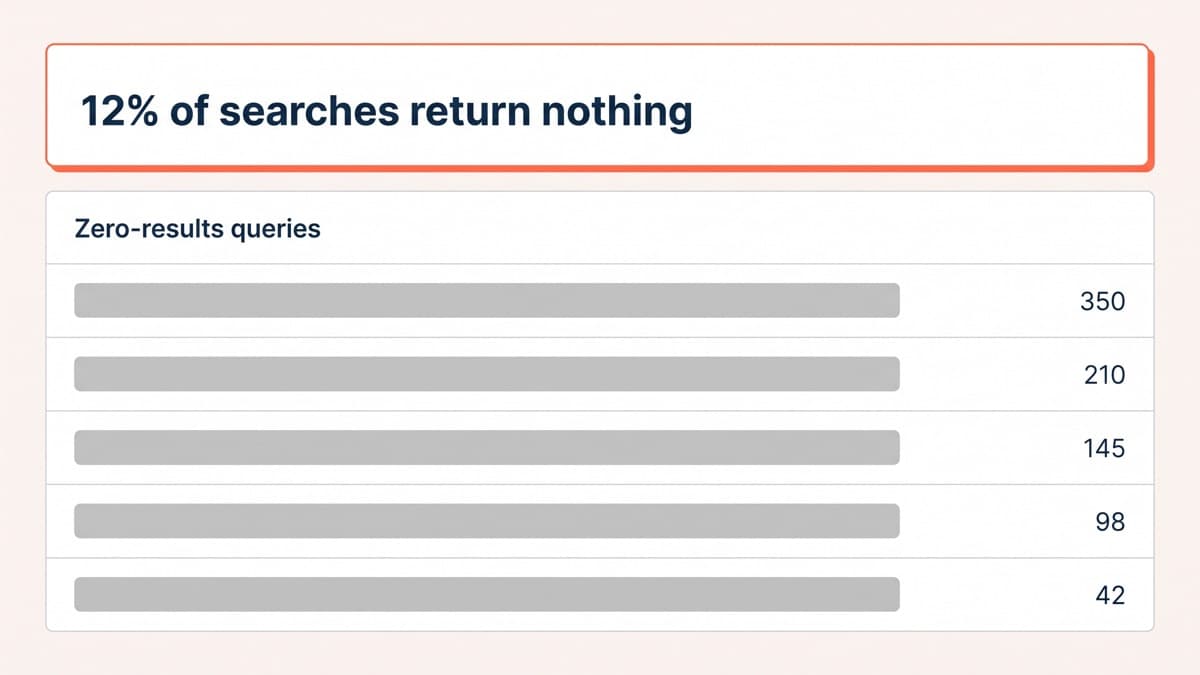
The findings are depressingly consistent: customers using words the catalogue does not use, misspellings returning empty pages, and out-of-stock items outranking sellable ones. In one audit, 12% of all queries returned zero results, and every one of those was a shopper announcing what they wanted and being shown an empty shelf.
Typo tolerance, synonyms and recovery
The first fixes are linguistic. Typo tolerance should be table stakes, because thumbs on glass misspell constantly, and a search that treats a one-letter slip as a novel request is functionally broken on mobile. Synonyms come from your own query report rather than anyone’s imagination: shoppers type hoodie when the catalogue says sweatshirt, wellies when it says rain boots, and every unmapped pair is a zero-results page you chose to keep.
The zero-results page itself should be treated as a landing page, because it is one. Never a bare no results found: show bestsellers, the closest category links, a corrected-spelling suggestion and a way to ask a human. A reasonable target is a zero-results rate under 5%; the stores that arrive with 10 to 15% get most of the way there on synonyms and typo tolerance alone. Watch the report monthly afterwards, because the language of demand shifts with seasons and marketing, and last quarter’s synonym map slowly rots.
Ranking and merchandising
Default ranking decides what the premium is worth. Relevance comes first, but pure text relevance is not a shop assistant: blend in availability so out-of-stock items sink, and popularity so proven products surface, and never, under any circumstances, alphabetical order, which is a filing system wearing a search costume. On top of that sits merchandising: promoting seasonal lines and key products for specific queries, deliberately and temporarily, with the results measured rather than assumed. Search results are the one page where you know precisely what the visitor asked for; ranking them lazily wastes the clearest signal your store receives. Availability weighting matters more than it sounds: a search that keeps surfacing sold-out heroes trains shoppers to stop searching at all, and the premium quietly evaporates. Re-run the top 20 queries from the audit after every ranking change.
Mobile search UX
On mobile, search earns more prominence than it usually gets, because typing intent beats thumbing through collection pages. A visible field or a large target in the thumb’s reach, a full-screen input with instant suggestions as the shopper types, recent searches remembered, and results that render fast enough to keep up with editing. Instant suggestions do double duty, part navigation and part spelling correction, because the shopper picks the suggestion instead of finishing the typo. Placement is testable rather than doctrinal: an exposed field generally beats a bare icon, and the gap grows with catalogue size, but the honest answer is to try it on your own traffic.
Shopify specifics
On Shopify, native search plus the free Search & Discovery app covers more than it used to: synonym groups, boosted products, filters and basic merchandising. For a small, conventionally named catalogue it is often enough. Dedicated search apps add proper typo tolerance, better ranking controls and search analytics, at a monthly fee and a script weight that belongs in the same cost-benefit sum as every other app, the sum described in our Shopify app audit guide. Catalogue size and query volume decide the upgrade, not the sales page.
Wiring any of it into the theme, instant search that does not jank, filters that hold state, zero-results pages that pull live bestsellers, is standard Shopify development work, and it is worth doing properly, because search UI half-installed by an app’s default embed is how stores end up with two search bars.
Test it like the high-intent page it is
Search changes are also unusually pleasant to test, because the segment is small but dense with buyers: a high-intent audience reads faster than a sitewide test on the same store. Measure search conversion, zero-results rate and search exits before and after every change, in the same funnel-first spirit as our GA4 funnel walkthrough. If traffic is too thin even for that, most of the fix list above is safe to adopt on priors alone. The visitors typing into that box have already done the hardest part of your marketing for you; the least a store can do is answer them.